
HABIT TRACKER
Rest days count too.
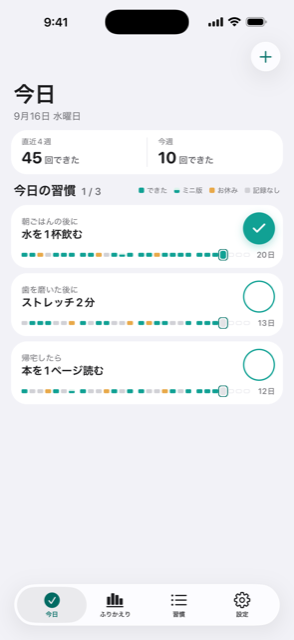
HabitTap is a habit tracker you use with a single tap.Log a full day, a scaled-down day, or a rest day —so one missed day never feels like starting over.
- No ads
- No account
- 8 languages
Three ways to log
There is no “failed” here.
Most habit apps give you two options: you did it, or you didn't. HabitTap adds a third.
- Done
You did what you planned. One tap and it's logged.
- Scaled down
A hard day, done small. “Read three pages” still counts. Not dropping to zero is what carries you into tomorrow.
- Rest
A day you chose to take off. Nothing breaks. Rest is part of the plan.
Days you don't log stay quietly unmarked. Nothing turns red, nothing warns you.
Features
You open it every day, so it stays light.
-
One tap to log
Today's habits are listed on one screen. Tap the circle. No forms, no confirmation dialogs.
-
Home screen widget
See today's progress without opening the app. Works on the Lock Screen too.
-
Look back by the week
A week of records at a glance — a shape you can read, not a pile of individual days.
-
How settled it is
A read on how established a habit has become, separate from a streak count. Not how many days in a row, but whether it takes thought any more.
-
A character that never scolds
It shows up briefly, only at the moments that matter. It never looks sad, and it never grows or wilts with your streak. You can hide it in settings.
-
Your data stays on your device
Records are saved on your phone. There's no account, and the content of your habits is never sent to a server.
-
Do it now (2 min)
Long-press the log button and pick it: the habit fills the screen and a two-minute timer starts. When it ends, log it right there.
-
Log automatically from Apple Health
Steps, workouts and mindful minutes can log your habits for you. Health data is only read on your device.
-
Pick your icon and widget
Change the app icon and the widget design to suit you. You see them every day, so make them yours.
How it works
Three steps to start.
- 01
Anchor it to something you already do
“After breakfast, a glass of water.” Attaching a habit to an existing routine holds better than picking a time.
- 02
Decide the small version first
Write down the scaled-down version while you still feel good. Having one ready is what changes the outcome on a bad day.
- 03
Tap every day
Log the full days, the small days, and the rest days. After a week, your own shape starts to show.
FAQ
Common questions
Which devices are supported?
iPhone and iPad, running iOS 18 or later.
Do I need an account?
No. There's no email to enter — download it and start.
Where are my records stored?
On your device. The names of your habits and what you logged are never sent to a server.
What is the “scaled down” option?
A smaller version of the habit, for hard days. Against “run for 30 minutes” you might set “put your shoes on and step outside”. It still counts as done, and nothing breaks.
If I miss a day, do I lose my streak?
Not if you log it as a rest day. Days you don't log stay unmarked, but the app won't warn you or put your streak front and centre.
Can I turn the character off?
Yes, in settings. With it hidden, those places show the text alone.
Are there ads?
No. And nothing is collected for advertising purposes.
Get started
Pick one, for today.
Choose a single habit, and tap it tomorrow.
Download on the App StoreAndroid version coming soon